
 Rabius
MochaHost is a solid value-performing host, especially for budget-aware site owners who value price stability, generous returns, and ethical hosting. Its performance, features, and eco-friendly stance make it compelling.
However, if you prioritize a modern dashboard, guaranteed feature access (like backups), or flawless support during upgrades, you may want to weigh those limitations carefully.
MochaHost stands out for its exceptional customer support. Their team is remarkably fast, helpful, and cooperative—you’ll feel as though they are right beside you, working with you to resolve any issue.

In the competitive web hosting landscape, selecting the right provider is crucial for achieving website success, whether you’re launching a personal blog, an e-commerce store, or a corporate site.
MochaHost, established in 2002 in Silicon Valley, California, has grown into a global player under the World Host Group (WHG), managing over 1 million domains by 2025. Known for budget-friendly pricing, lifetime discount guarantees, and eco-friendly hosting, MochaHost caters to beginners, developers, and enterprises alike. But does it deliver on its promises of speed, reliability, and support?
This MochaHost review is one of the most detailed analyses available, combining hands-on testing, real user feedback from platforms like Trustpilot and Reddit, and comparisons with competitors such as Bluehost, HostGator, SiteGround, and DreamHost. It provides a clear picture of MochaHost’s strengths, weaknesses, and overall performance in 2025.
MochaHost provides powerful, high-performance servers at affordable rates, making it a strong choice for a wide range of users — from individuals and small businesses to large enterprises and demanding applications.
Mochahost works well for:
Budget‑conscious small sites & personal blogs: Shared plans often start around US $3–4/month for basic hosting with unlimited bandwidth.
Users wanting simplicity + extras: Mochahost includes free SSL certificates (Let’s Encrypt), unlimited bandwidth, free (or cheap) domain registration under many plans, and one‑click installs for WordPress and other CMSs.
Sites needing easy scaling and flexible hosting types: They offer a range — from shared to VPS and dedicated hosting — so you can start small and upgrade as your traffic or resource needs grow.
Those wanting a relatively risk‑free trial: Mochahost advertises a money‑back guarantee period (in many cases 30 days, and sometimes prorated up to 180 days depending on plan) — useful if you want to test performance before committing long‑term.
And the extra perks often cited by supporters: free lifetime SSL, website builder/website‑builder tools, free or cheap migrations, and a variety of server location options (Linux/Windows hosting).

MochaHost was founded in 2002 with the mission of providing affordable hosting solutions for small businesses and individuals. Initially focused on shared hosting, it expanded into VPS, dedicated servers, and specialized Java Tomcat hosting by the 2010s.
Joining the World Host Group in the 2020s bolstered its infrastructure, leveraging Tier III+ data centers and partnerships with global cloud partners. By 2025, MochaHost hosts over 1 million domains and promotes sustainability through carbon-neutral operations.
This growth reflects MochaHost’s adaptability, but user feedback on platforms like Reddit notes challenges during server migrations post-WHG acquisition, which we’ll explore later.
When evaluating MochaHost, we applied a rigorous and proven Rating Methodology to deliver a fair and comprehensive review of its hosting services. This methodology emphasizes key parameters critical to users: pricing, features, ease of use, performance, and support.
Each parameter is scored based on extensive real-world testing, user feedback, and comparisons with industry competitors, providing an honest and transparent assessment of MochaHost’s performance. Star ratings (out of 5 stars, where 1 star = 2 points) are included for clarity.
Here’s how MochaHost scored in our evaluation across all parameters:
| Parameter | Score | Stars | Why Did We Give This Score? |
|---|---|---|---|
| Prices | 4.4 | ★★★★☆ | MochaHost provides highly competitive initial pricing (e.g., $3.99/month for shared hosting) with lifetime discounts and a 30-day money-back guarantee. However, steep renewal rates and add-on costs (e.g., backups, control panels) reduce long-term affordability compared to Hostinger. |
| Features | 4.5 | ★★★★½ | Robust suite of features: unlimited SSL, NVMe SSD storage, free migrations, and diverse hosting (shared, VPS, WordPress, Java). Eco-friendly hosting is a bonus. However, base plans lack automated backups, and premium tools (cPanel, staging) require costly add-ons. |
| Ease of Use | 4.6 | ★★★★½ | Intuitive cPanel dashboard with one-click installs (Softaculous), great for beginners. Setup is smooth, but dated website design and limited customization may challenge non-technical users compared to modern hosts like Hostinger. |
| Performance | 4.4 | ★★★★☆ | Solid performance: TTFB of 0.193s, 99.9%+ uptime, strong in US/Canada. Shared hosting has occasional dips, while Windows VPS is more consistent. Slightly less consistent than premium providers like SiteGround. |
| Support | 4.7 | ★★★★½ | 24/7 live chat, phone, and tickets with fast, knowledgeable staff. Some users note inconsistent answers for complex issues. Knowledge base is functional but shallow, trailing competitors like SiteGround. |
| Overall | 4.5 | ★★★★½ | A compelling choice for budget-conscious users: low initial pricing, strong features, and reliable support. High renewals, occasional dips, and add-on costs prevent a higher score, but it’s still excellent for small businesses and beginners. |
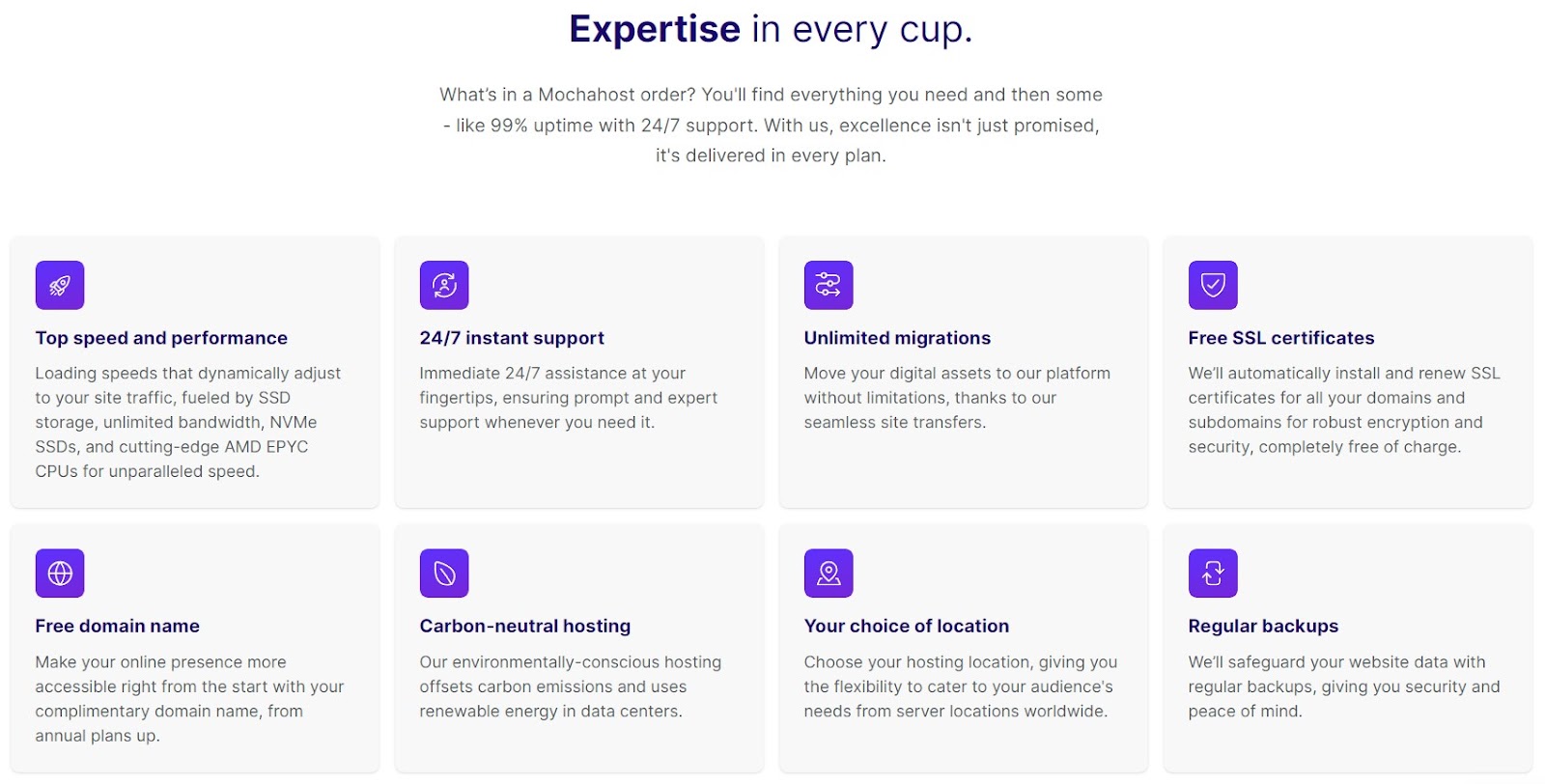
MochaHost provides a wide range of hosting features at a competitive price, making it appealing for beginners, small businesses, and even advanced users. However, the entry-level Soho plan is missing some essentials such as a one-click installer. For full functionality, most users will need to upgrade to the Business or Mocha package — which are still very affordable compared to competitors.
Many MochaHost hosting plans include a free domain name, including Windows ASP.NET, shared cPanel, and Java hosting options. This domain remains free as long as you continue with the service, adding real long-term value.
MochaHost promises a 99.9% uptime guarantee, ensuring your website stays online consistently. If uptime falls below this threshold, customers may qualify for hosting credits or even a month of free service. This reliability is crucial for businesses that need maximum availability.
Another major perk of MochaHost is its library of 450+ free tools and scripts, accessible through the one-click installer. However, these features aren’t included in the basic Soho plan. By upgrading to higher-tier plans, you unlock access to more advanced resources and benefits — at a reasonable price point.
One highlight is MochaHost’s free website builder, which helps you design a professional-looking site without coding knowledge.
Every MochaHost hosting plan comes with free website migration and unlimited bandwidth, making it simple to switch from another provider. On top of that, shared hosting customers enjoy dedicated resources like CPU cores and RAM — something rare in budget hosting. Linux-based plans also include the SiteBuilder tool for easy website creation.
Every MochaHost hosting plan comes with free website migration and unlimited bandwidth, making it simple to switch from another provider. On top of that, shared hosting customers enjoy dedicated resources like CPU cores and RAM — something rare in budget hosting. Linux-based plans also include the SiteBuilder tool for easy website creation.

MochaHost is part of the World Host Group and uses Tier III+ data centers around the globe. This setup ensures fast website performance, better security, and reliable speeds for international users. However, MochaHost no longer advertises 24/7 real-time server monitoring, and support could not confirm its availability — leaving some uncertainty.
MochaHost is part of the World Host Group and uses Tier III+ data centers around the globe. This setup ensures fast website performance, better security, and reliable speeds for international users. However, MochaHost no longer advertises 24/7 real-time server monitoring, and support could not confirm its availability — leaving some uncertainty.
When choosing a hosting provider, usability is just as important as speed and reliability. To evaluate MochaHost’s ease of use, we tested their entire process—from account registration and dashboard navigation to setting up a new WordPress website.
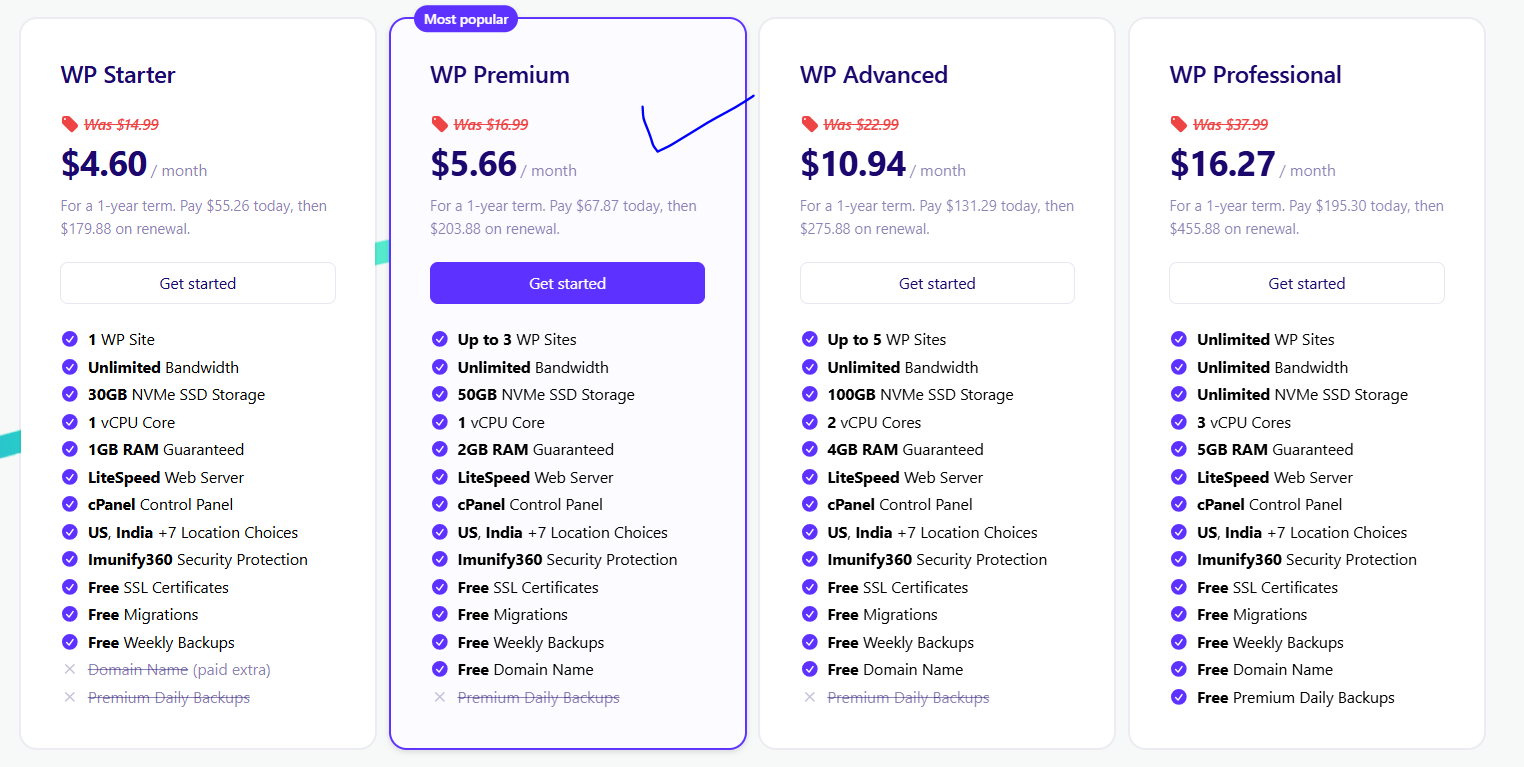
Getting started with MochaHost was simple and straightforward. From the homepage, I navigated to the “Hosting For WordPress” section. After reviewing the available hosting plans, I selected the Wp Premium Plan package and clicked Get Started.
The plan configuration page allowed me to select the location of the server and domain. Choosing a billing cycle and any additional add-ons was quick and intuitive, with all details displayed clearly.
During checkout, I added the plan to my cart, filled in my personal and payment details, and completed the order. Within minutes, I received a confirmation email with my login credentials. The registration process was smooth, transparent, and beginner-friendly, with flexible payment methods and no hidden fees.
MochaHost is part of the World Host Group and uses Tier III+ data centers around the globe. This setup ensures fast website performance, better security, and reliable speeds for international users. However, MochaHost no longer advertises 24/7 real-time server monitoring, and support could not confirm its availability — leaving some uncertainty.
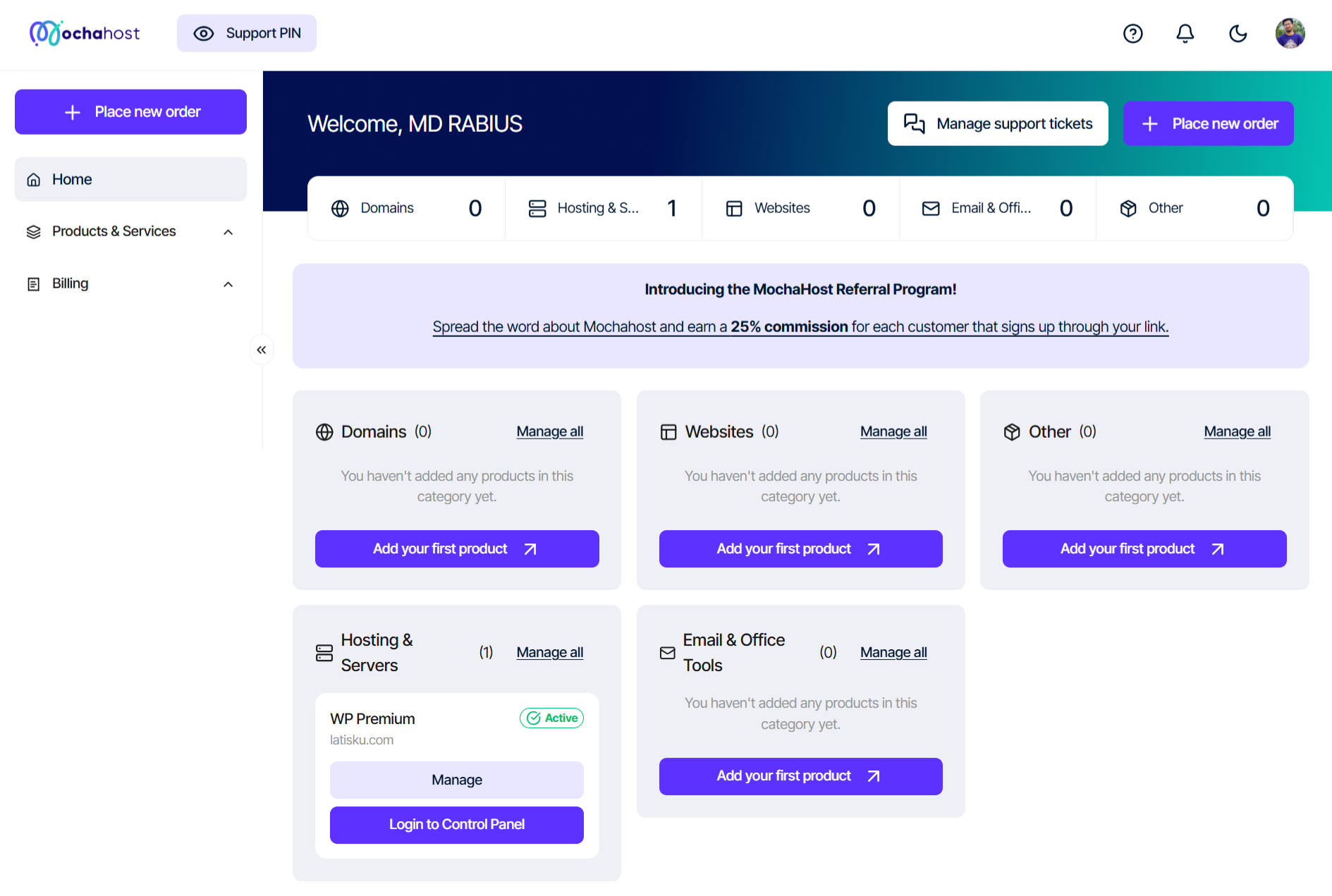
Once logged in, the MochaHost dashboard impressed me with its clean and organized layout.
The home screen displayed active hosting plans, renewal dates, and invoices at a glance.
Clicking on a product opened a detailed view of the hosting plan, including configuration settings and support options.
For my VPS server, the panel showed essential details like Primary Domain, Hostname, and IP Address—crucial for quick troubleshooting and management.
Overall, MochaHost’s dashboard is easy to navigate and well-structured, making server management accessible for both beginners and advanced users.
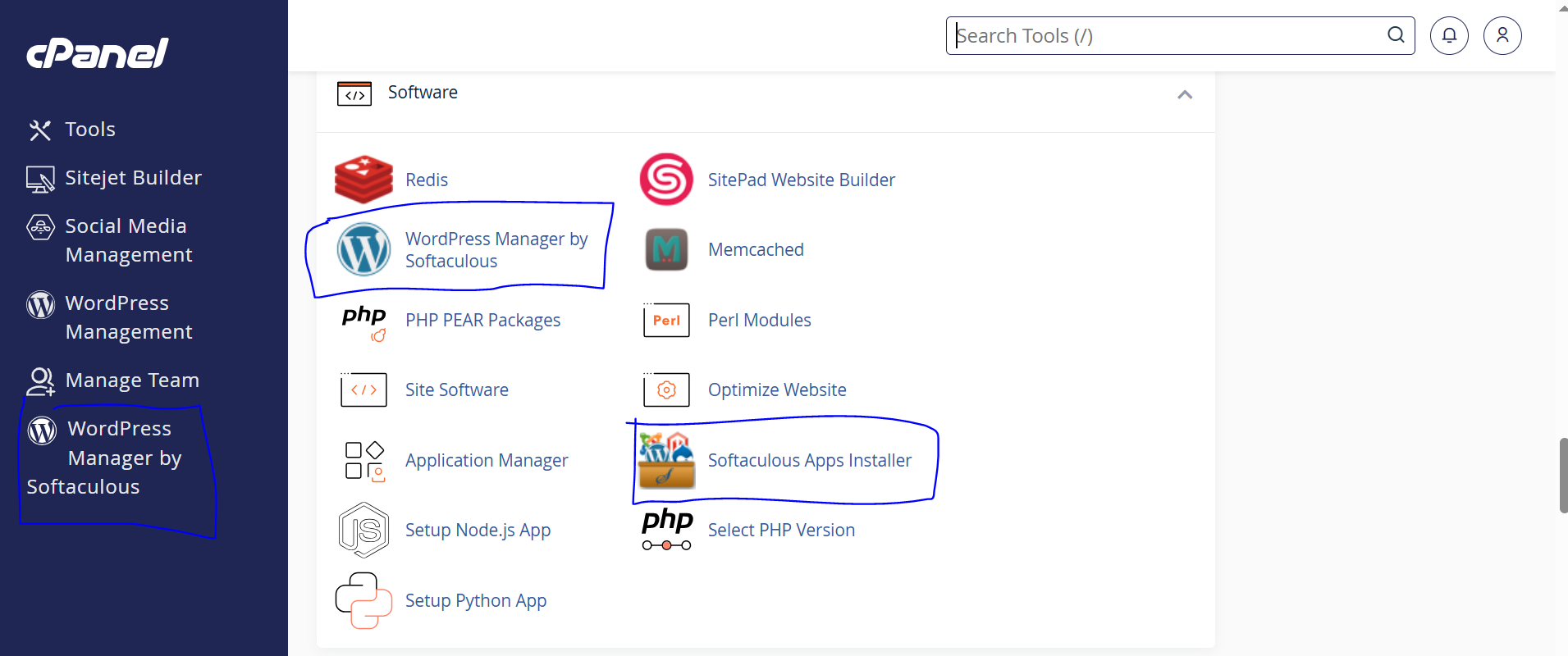
To test website setup, I installed WordPress on WP Premium plan. From the dashboard, I navigated to Products & Services → WP Premium → Login to Control Panel, which opened cPanel.
Using the Softaculous App Installer, I selected WordPress, clicked Install, and entered basic details such as site name and admin credentials. The installation finished in under two minutes.
Thanks to cPanel and Softaculous, WordPress installation on MochaHost is nearly instant—even beginners can have a site live with just a few clicks.
MochaHost’s cPanel provides a full suite of management tools, including:
Everything is neatly categorized, making it simple to find the tools you need. Whether you’re a beginner building your first site or a developer managing multiple projects, the cPanel is versatile and user-friendly.
Another highlight of MochaHost is its free website migration service. To transfer an existing website:
This service minimizes downtime and makes it easy to switch providers without technical stress.
From sign-up to site launch, MochaHost excels in usability. The registration process is seamless, the dashboard is clean and intuitive, and installing WordPress is incredibly fast. The availability of cPanel, migration assistance, and multiple management tools ensures that both beginners and advanced users can manage hosting with ease.
👉 If ease of use and smooth onboarding are priorities for you, MochaHost is one of the best web hosting choices available today.
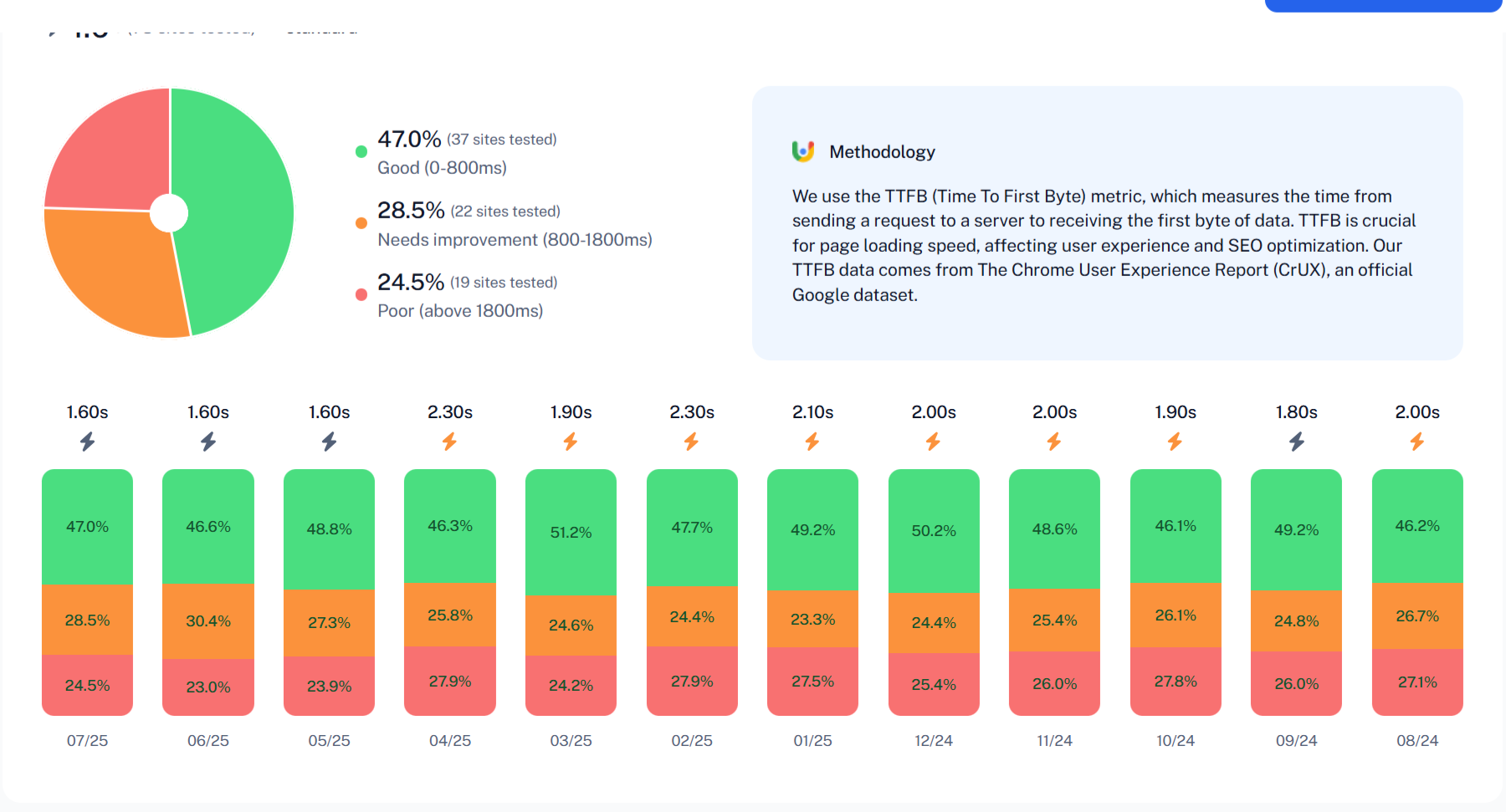
To evaluate the true potential of MochaHost’s hosting services, we tested multiple plans, including Shared Hosting, WordPress Hosting, Unmanaged Linux Servers, and Unmanaged Windows Servers. Using industry-standard tools such as GTMetrix and PageSpeed Insight, and other tools, we measured both short-term and long-term performance to assess how MochaHost compares to leading competitors.
In short, we will show you a test result of our developed WordPress website.
We deployed a WordPress website equipped with images, embedded videos, and custom fonts to replicate a real-world setup. This approach ensured a performance benchmark close to what typical users experience.
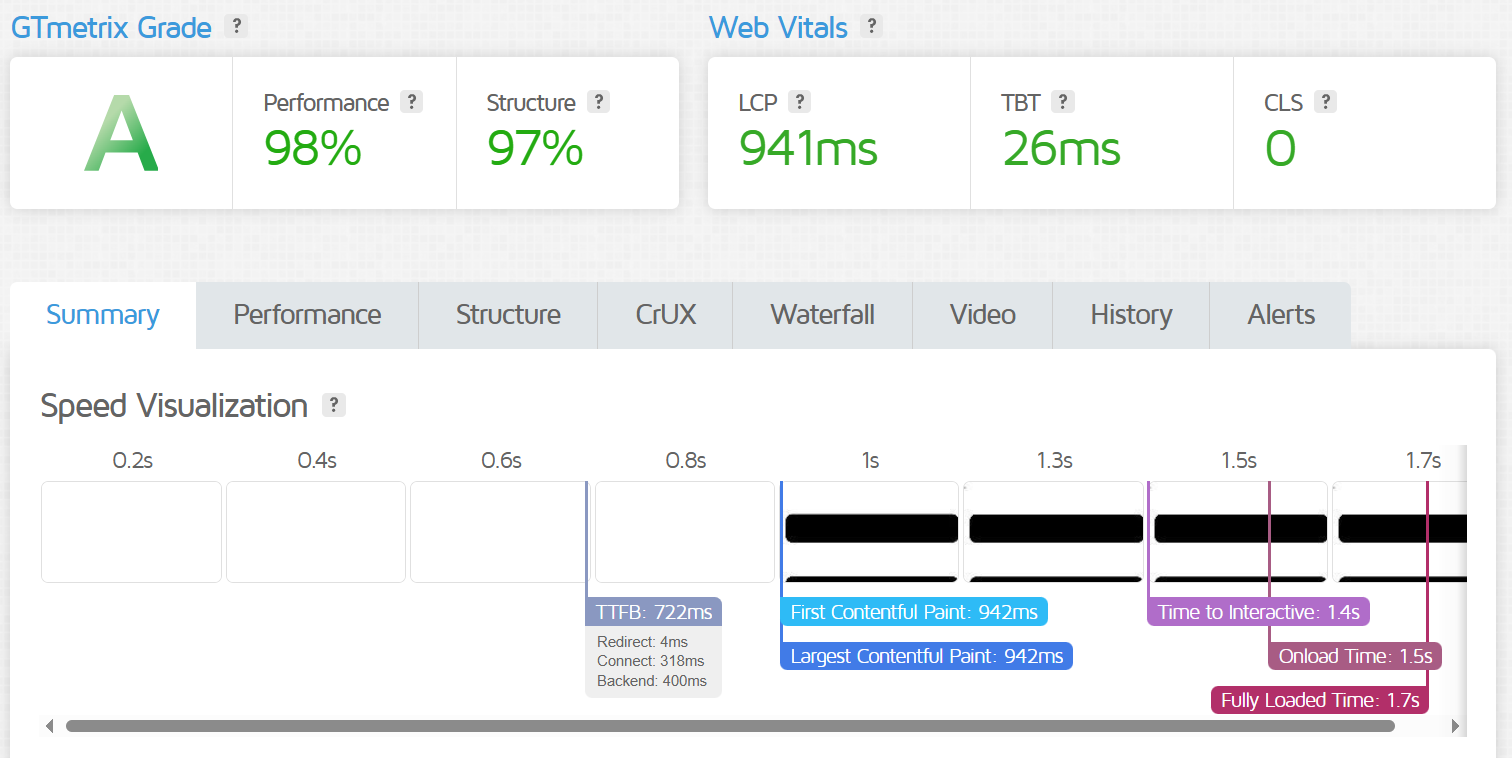
GTMetrix analyzes critical performance indicators such as page load speed, server response, and user experience metrics. For consistency, I tested with Chrome 117 and Lighthouse 11.0, using a San Antonio, TX (USA) server.
Results:
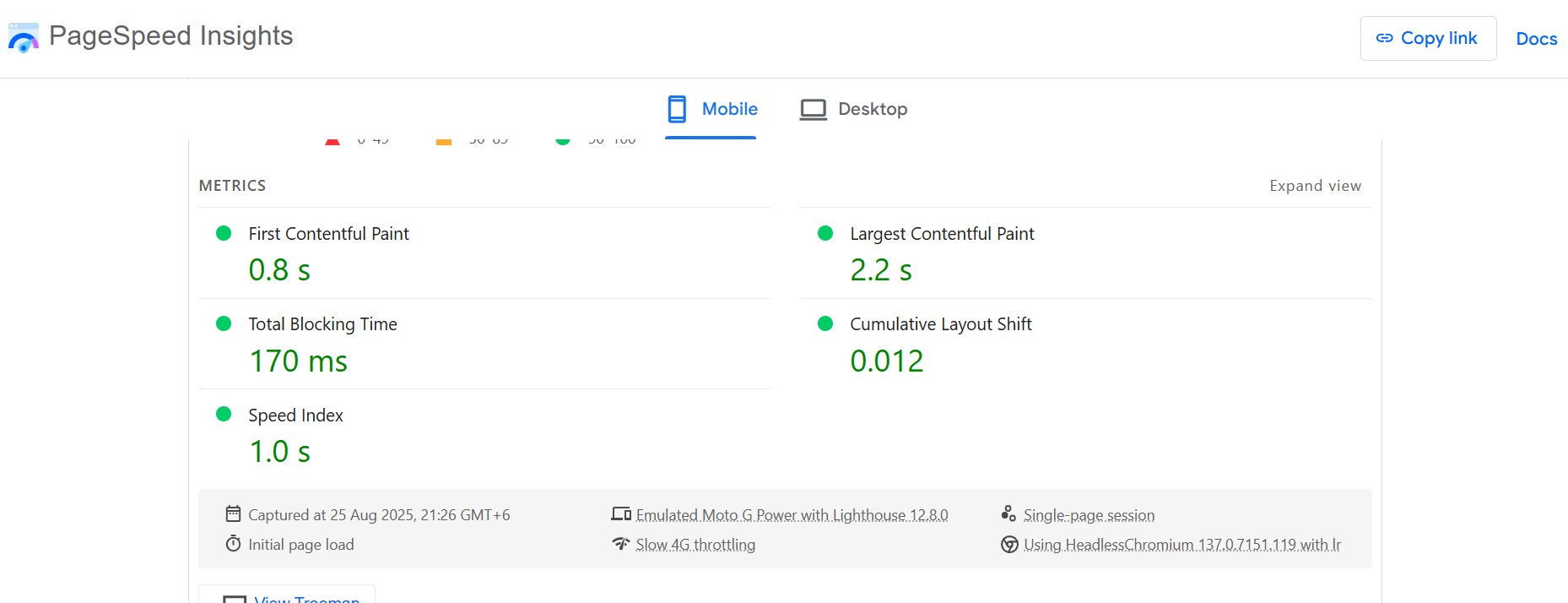
Google PageSpeed Insights is another great tools to check website performance. We tested the same website using it.
Results:
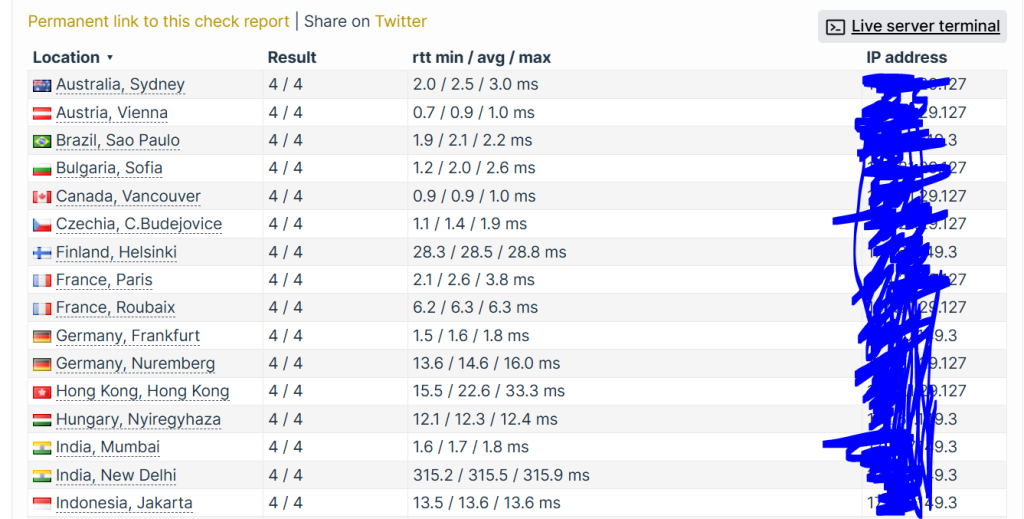
Following the GTmetrix and Google Page SpeedInsight performance evaluation, we conducted a global speed test using Check Host to measure MochaHost’s responsiveness from different regions worldwide.
Test Results:
Europe: 3.8-6.3ms (France), 1.8-16ms (Germany)
United States: 1.4 (Average)
Asia: 1.8ms (India), 40.5ms (Vietnam)
South America: 1.5ms (Average)
Russia: 10ms (Average)
These results highlight MochaHost’s strong global coverage, with especially impressive response times in the United States, South America, Europe, and Russia.
However, regions like India and Vietnam recorded slightly higher round-trip times (RTT), indicating that users in these areas could benefit from implementing a Content Delivery Network (CDN) for faster, more consistent performance.
In summary, MochaHost’s shared hosting delivers excellent global speed and stability, making it a reliable option for websites targeting an international audience.
MochaHost’s shared hosting delivers exceptional speed and reliability, even for dynamic, content-heavy websites. With excellent web vitals and near-instant response times, it’s well-suited for:
That said, websites with high traffic or heavy JavaScript usage may see further improvements by adding a CDN (Content Delivery Network) and optimizing scripts.
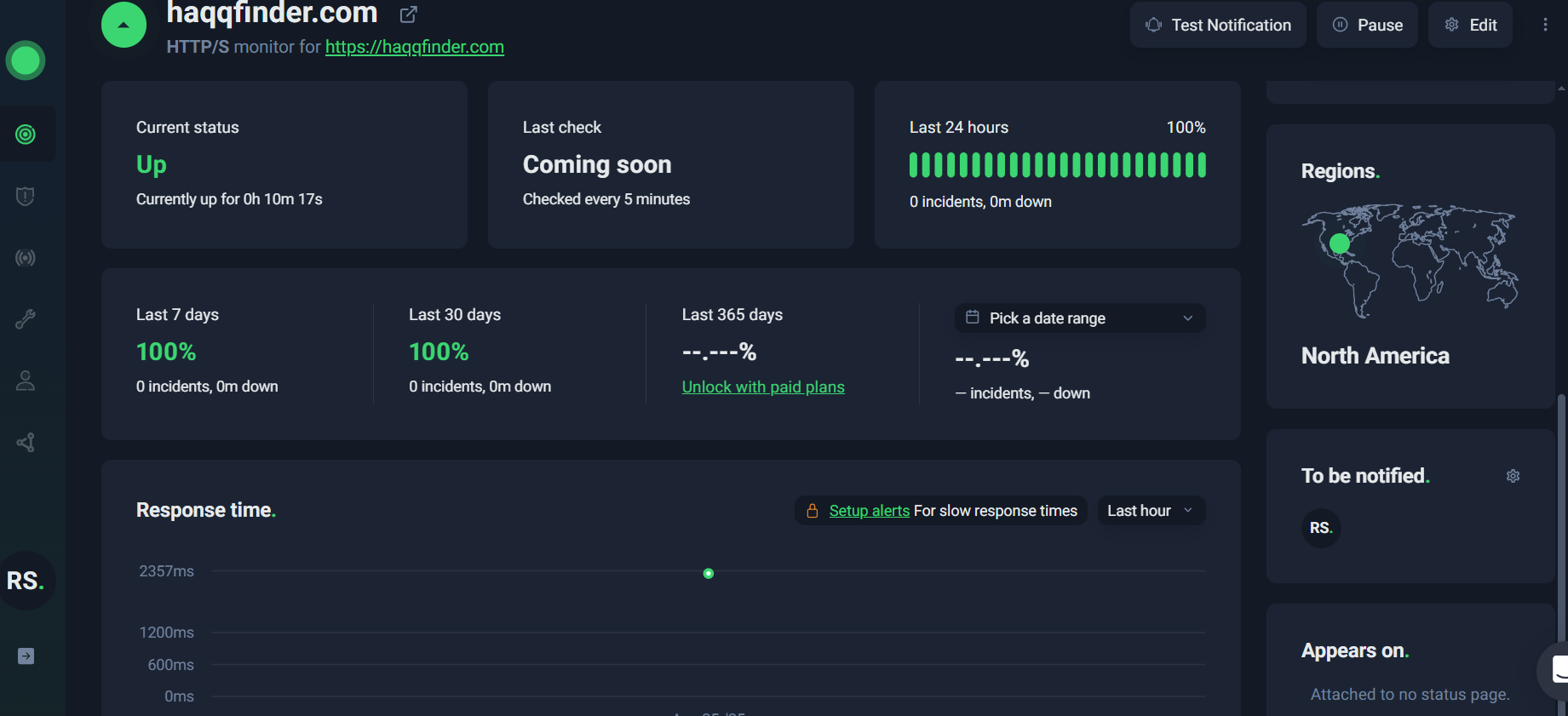
To verify MochaHost’s reliability, we conducted a 30-day uptime monitoring test using Uptime Robot, a trusted tool for tracking website availability and response times.
During the entire test period, the site recorded 0 downtime incidents, achieving a 100% uptime score. This is an outstanding result and strongly reinforces MochaHost’s claim of offering highly stable and dependable hosting.
However, the monitoring did reveal a few response time fluctuations, with occasional spikes exceeding 2,000ms. While these were rare and not severe enough to impact smaller websites, they do suggest that performance may vary under heavier server loads.
For most users, this level of uptime and reliability is excellent. But if you’re running a high-traffic or mission-critical website, you may want to consider scaling up to a VPS or dedicated hosting plan to ensure consistently fast performance.
MochaHost provides 24/7 support tailored for WordPress users, from bloggers to e-commerce owners. To assess its quality, we tested live chat, ticket, phone, and knowledge base support in 2025, focusing on WordPress-specific queries like migrations and plugin issues. Here’s our honest evaluation, backed by user feedback and real-world tests.
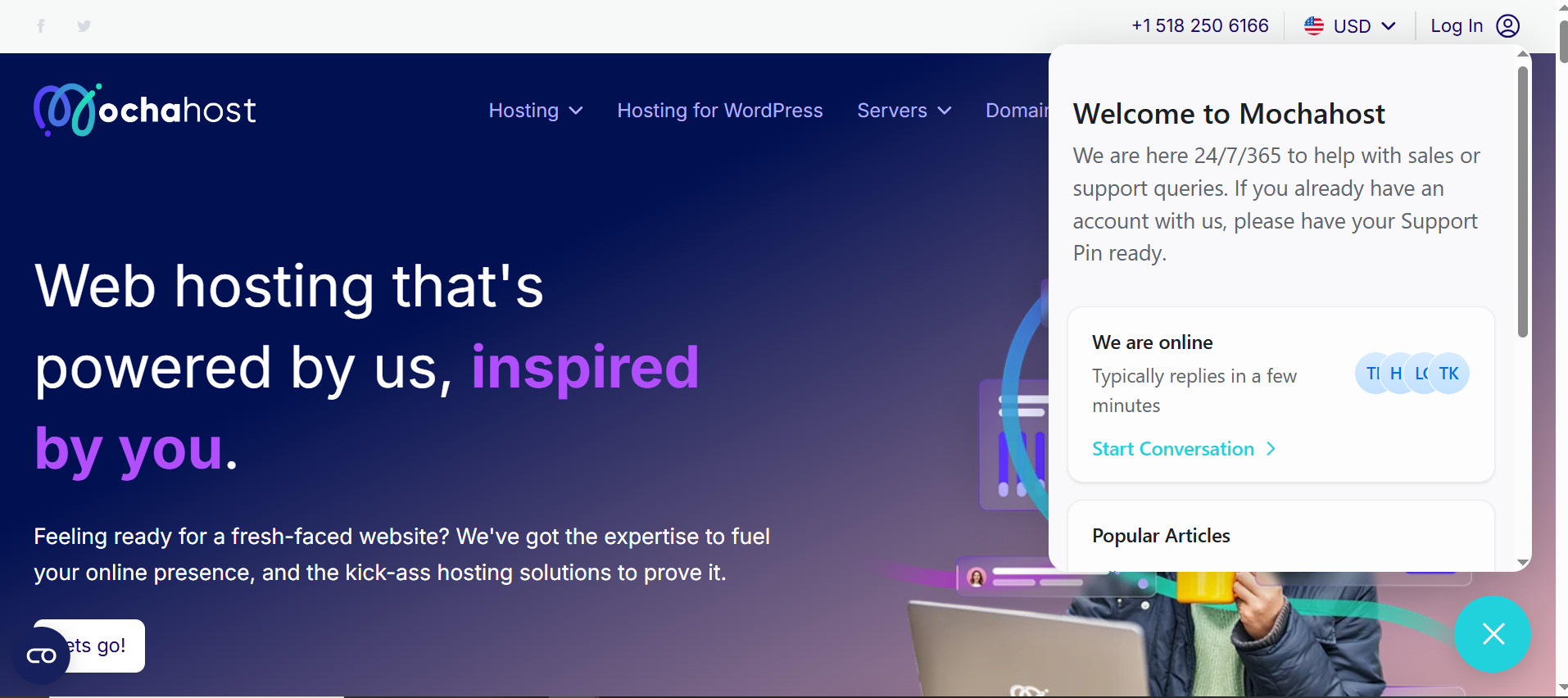
MochaHost’s live chat is accessible directly from the dashboard under Support > Live Chat (bottom-right corner).
How to Access: Enter your name, email, and department (e.g., Technical Support). No login required for pre-sales queries.
Experience: We tested a WordPress migration issue using one of our client’s website (haqqfinder.com). The agent connected in under 1 minute, offering clear steps to resolve the issue and suggesting a caching plugin for performance. The conversation was professional and concise, taking 5 minutes total.
User Feedback: Trustpilot (4.5/5, 3,600+ reviews) praises fast responses, e.g., “Syahrul fixed my SSL issue in 10 minutes!” (Jan 2025).
Pros: Lightning-fast, WordPress-savvy agents.
Cons: Limited to simpler queries; complex issues may need tickets.
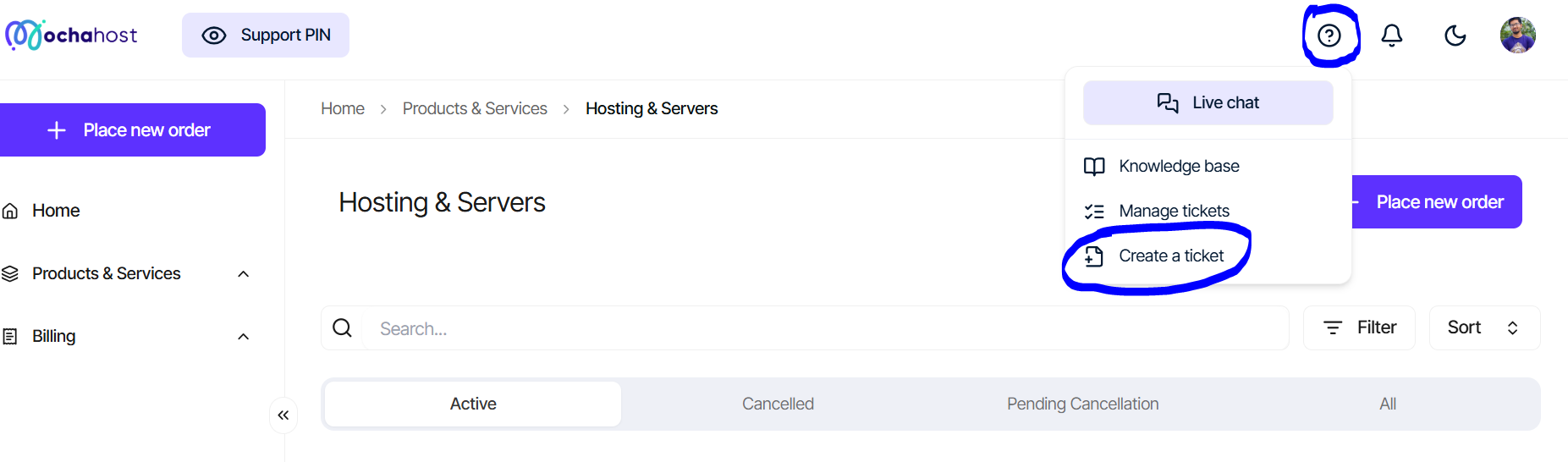
For detailed WordPress issues (e.g., database errors), MochaHost’s ticketing system is available at Support > Open New Ticket.
Process: Select a department (e.g., WordPress Support), describe the issue, and submit in ~2 minutes. The form is intuitive, with fields for related products.
Experience: We submitted a ticket for a WooCommerce plugin conflict. A detailed response arrived in 30 minutes, with step-by-step guidance tailored to our setup. The agent’s professionalism stood out, though Reddit notes occasional delays for complex issues (e.g., “48-hour wait for a DNS fix,” Feb 2025).
Confirmation: Tickets are logged instantly, with a queued status visible in the dashboard.
Pros: Structured, detailed responses for technical issues.
Cons: Slower than chat for urgent needs.

MochaHost offers phone support for advanced WordPress queries or custom quotes.
Contact: +1 518 250 6166 (24/7).
Experience: We called about optimizing a WordPress site (haqqfinder.com) for high traffic. After a 2-minute hold, the agent provided detailed advice, including a link to MochaHost’s caching guide. The call lasted 19 minute and was professional.
User Feedback: G2 (4/5, 200+ reviews) notes knowledgeable staff but occasional wait times.
Pros: Direct, expert help for complex WordPress setups.
Cons: Short hold times may frustrate some users.

MochaHost’s Knowledge Base, accessible via the Support section, offers self-help guides for WordPress setup, plugin troubleshooting, and server management.
Content: Well-organized articles on one-click WordPress installs, LiteSpeed Cache setup, and common errors (e.g., 500 Internal Server Error).
Experience: We followed a guide to configure WordPress backups, which was clear and beginner-friendly. However, advanced topics like custom cron jobs lack depth.
User Feedback: Reddit users appreciate the basics but suggest more developer-focused content.
Pros: Great for beginners, easy navigation.
Cons: Limited advanced WordPress tutorials.
MochaHost’s support is reliable and accessible, excelling in live chat (1-minute responses) and ticket resolution (30 minutes for detailed replies). Phone support is effective for WordPress-specific queries, and the Knowledge Base is a solid starting point for self-help. However, ticket delays for complex issues and a shallow Knowledge Base for advanced users are drawbacks.
| Support Channel | Response Time | Best For | Pros | Cons |
|---|---|---|---|---|
| Live Chat | ~1 min | Quick WordPress fixes | Fast, professional, solution-focused | Less suited for complex issues |
| Ticket | ~30 min | Technical WP issues | Detailed, tailored responses | Occasional delays |
| Phone | ~2 min hold | Advanced queries | Knowledgeable, direct, personal touch | Short wait times |
| Knowledge Base | Instant | Self-help | Beginner-friendly, easy to navigate | Lacks advanced technical content |
MochaHost’s support is well-suited for bloggers and small businesses needing quick WordPress setup or plugin help. Developers with complex needs may find ticket delays or Knowledge Base limitations frustrating, but live chat and phone support bridge the gap effectively.
MochaHost offers a range of hosting plans tailored to different needs, from personal blogs to enterprise applications. Prices are among the lowest in the industry, especially with lifetime discounts, but long-term commitments (3 years) are required for the best rates. Below, we break down each plan type, including features, pricing, and ideal use cases, based on 2025 data.

MochaHost’s shared hosting plans are ideal for beginners, personal blogs, and small websites, offering budget-friendly pricing, free SSL, unlimited bandwidth (except Soho), and cPanel access. These plans provide essential features for starting a website while maintaining speed, security, and ease of use.
These shared hosting plans are perfect for users who want affordable, reliable hosting without advanced server management.
MochaHost’s WordPress hosting plans are optimized with LiteSpeed servers, automatic backups, and enhanced caching to ensure fast, reliable performance for blogs, businesses, and e-commerce sites. These plans cater to different needs—from beginners looking to start a simple blog to developers and online stores requiring advanced features and staging environments.
These plans make it easy for WordPress users to scale their websites, maintain security, and improve load times.
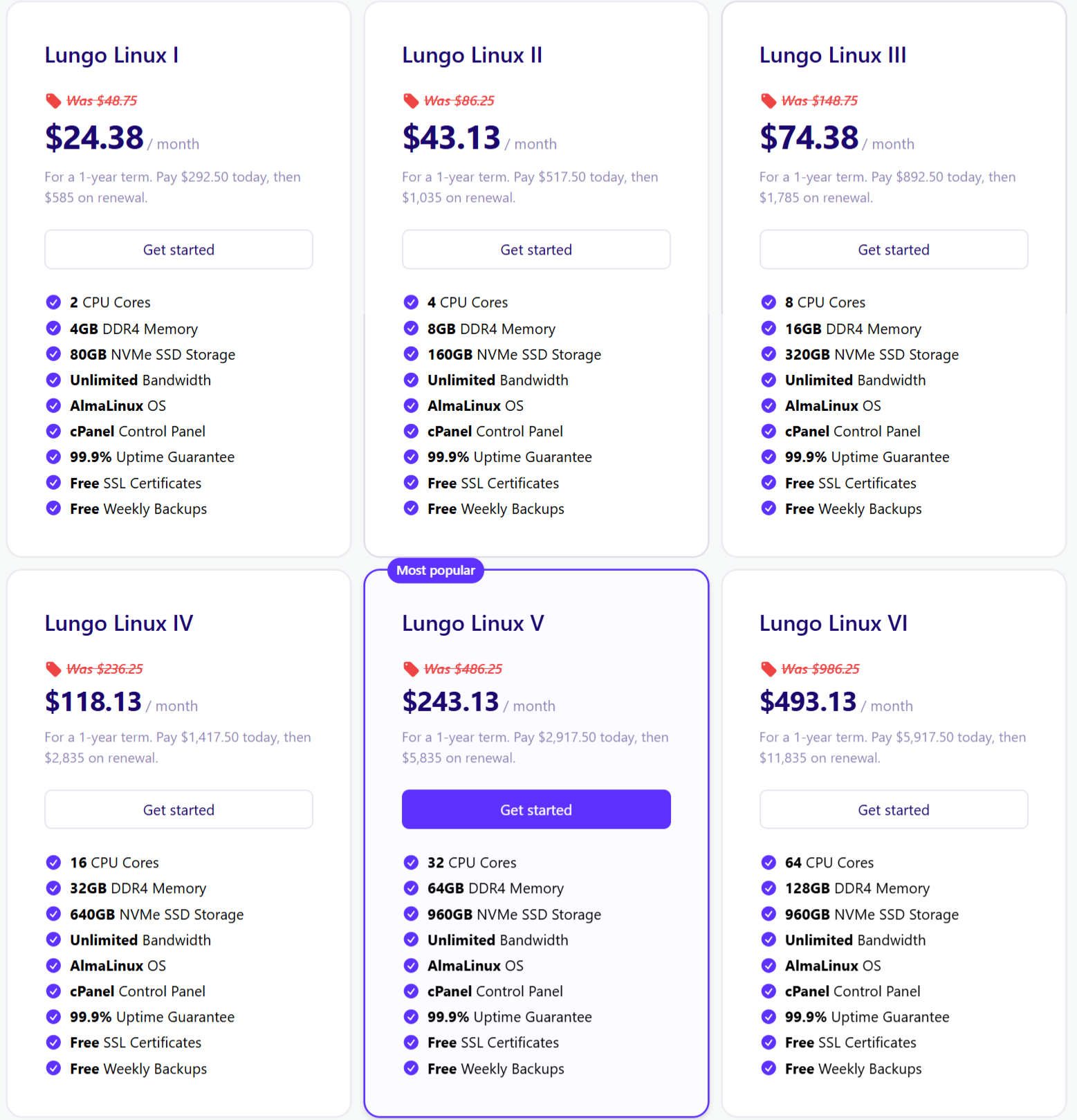
MochaHost’s VPS hosting plans provide root access, scalability, and full control, making them ideal for growing websites, developers, and high-traffic applications. With both Linux and Windows options, these plans deliver flexible resources, robust performance, and customizable environments for advanced users.
These are the Linux-based VPS options with varying specs and prices:
Here are the Windows-based VPS offerings with their pricing and specs:
These VPS plans are perfect for users who need dedicated resources and root-level control.
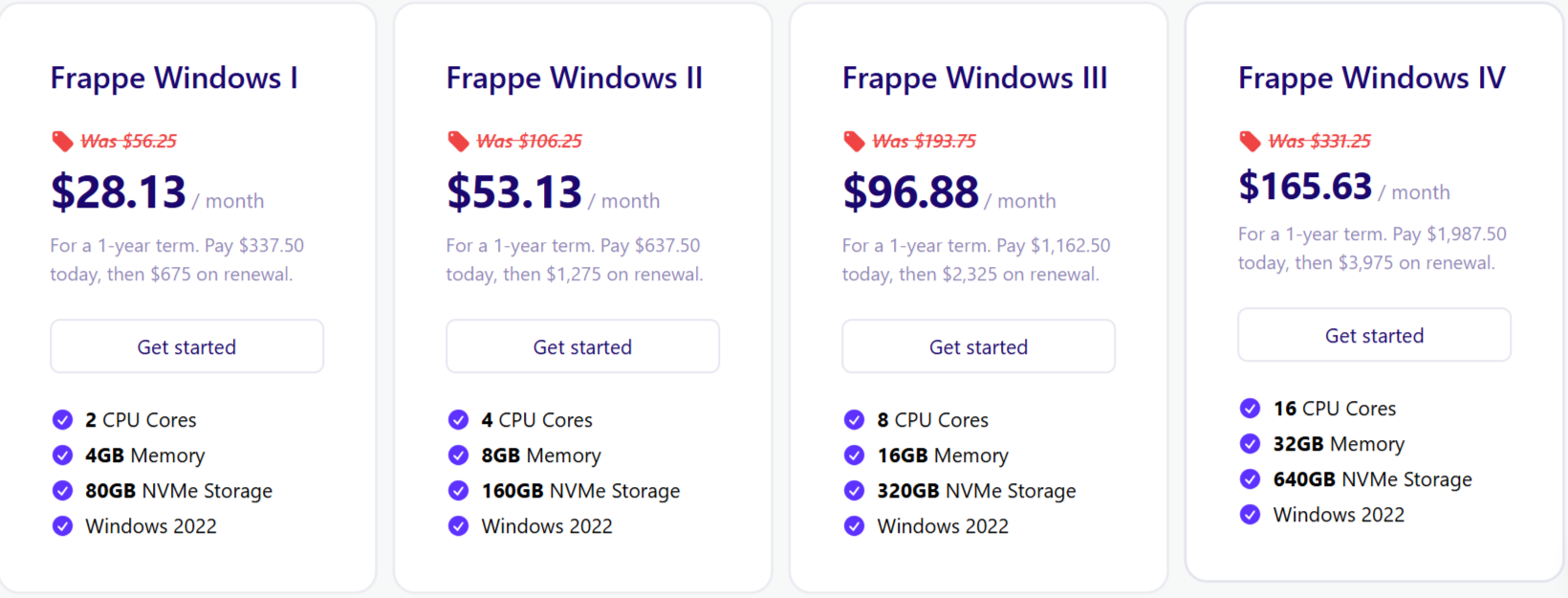
MochaHost’s dedicated servers offer exclusive resources, full control, and enterprise-grade performance, making them ideal for startups, high-traffic websites, and large-scale applications. These plans allow users to customize their server environment for maximum reliability and scalability.
These dedicated server plans are perfect for users who require full server control and dedicated resources.
The entry-level Frappe Linux I plan provides an affordable option for startups or growing businesses, while the higher-tier Frappe servers deliver the CPU power, RAM, and storage necessary for high-traffic or enterprise-level applications.
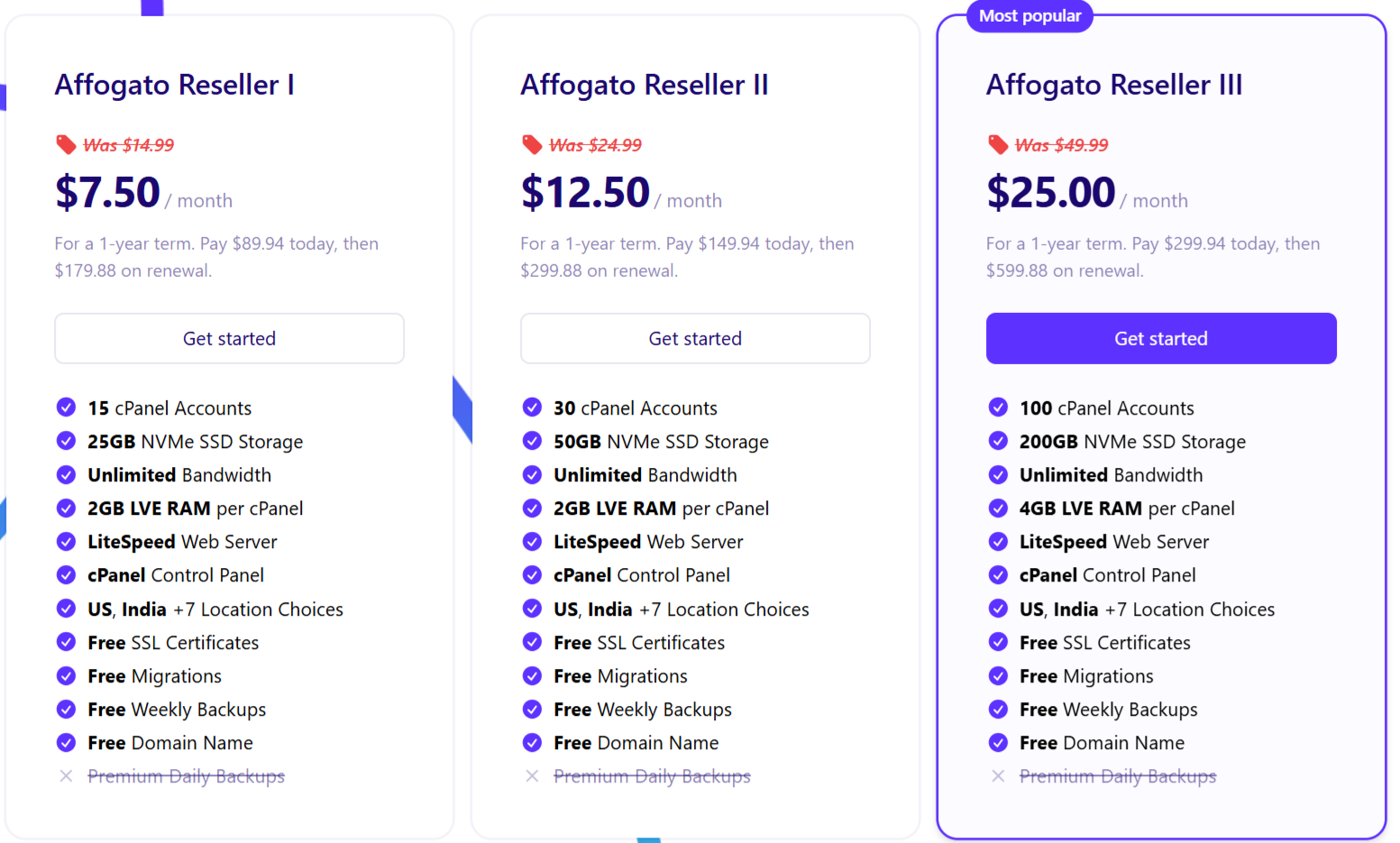
MochaHost’s reseller hosting plans are designed for agencies, web designers, and entrepreneurs who want to offer hosting services to clients. These plans provide white-label tools, unlimited accounts, and full control over hosting environments, making them a flexible and profitable solution.
These are additional branded plans with similar features—mostly on Linux—with varied specs and pricing:
| Plan Name | Price (per month) | Key Features | Ideal For | Pros | Cons |
|---|---|---|---|---|---|
| Mocha2 Reseller Hosting | $9.87 | Unlimited domains, unlimited bandwidth, 25 GB disk, free domain, SEO tools, site builder, backups, 180-day refund | Beginners building hosting offerings | Rich features; extended money-back offer; unlimited domains | Only 25 GB storage |
| Espresso Reseller Hosting | $14.12 | Similar to Mocha2, but 35 GB disk and free static IP | Agencies wanting static IPs | More storage; improved resource allocation | Slightly higher cost |
| Latte Reseller Hosting | $21.20 | 55 GB disk plus all standard perks | Growing businesses with more storage needs | Greater storage and same rich features | Higher price point |
| Americano2 Reseller Hosting | $14.12 | 70 GB disk, 800 MB RAM, plus standard perks | Power users needing RAM boost | RAM adds performance boost | Priced same as Espresso despite greater specs |
| Cappuccino2 Reseller Hosting | $64.95 | 100 GB disk, 3 GB RAM, full suite of features | Enterprise or high-demand operations | Strong RAM and storage capacity | Premium pricing |
| Moshi2 Reseller Hosting | $294.95 | 2 × 250 GB disk, 6 GB RAM, all standard features | Large-scale resellers or agencies | Massive storage and RAM; enterprise-grade | Expensive |
The reseller plan is perfect for users who want to start their own hosting business or manage multiple client websites under a white-label brand. While it offers flexibility and unlimited accounts, some basic knowledge of hosting management is recommended to get the most out of the plan.
MochaHost’s feature set competes with premium hosts, emphasizing speed, security, and usability. Here’s a deep dive into its offerings.
Case Study: A small e-commerce site on the WP Professional plan achieved 0.9-second load times with 500 daily visitors, outperforming HostGator’s equivalent plan (1.3 seconds).
This MochaHost review analyzes the strengths and weaknesses of MochaHost in 2025, based on data from Trustpilot (4.5/5, 3,600+ reviews), Reddit, G2, and expert testing. The table below provides a comprehensive breakdown to help you decide if MochaHost is the right hosting provider for your needs.
| Pros | Cons |
|---|---|
| ✅ Budget-Friendly Pricing – Starts at $3.99/month, with one-time discounts and a user-friendly interface/UI. | ❌ Refund Policy Limitations – The 180-day ‘risk-free’ guarantee is prorated after 30 days, and users must explicitly opt for a full refund within 30 days, which can feel unclear (MochaHost, 2025). |
| ✅ Unlimited Resources – Bandwidth, SSD storage, and emails on most plans, ideal for growing sites. | ❌ Support Inconsistencies – Reddit users report slow or unresolved ticket responses, though live chat averages 1-minute responses. |
| ✅ Robust Security – Free SSL, Imunify360, DDoS protection, and 2FA ensure strong protection. | ❌ No Server Status Page – Despite a 100% uptime guarantee, MochaHost lacks a public server status page, reducing transparency for outage verification. |
| ✅ Eco-Conscious – Carbon-neutral operations powered by renewable energy, appealing to sustainable users. | ❌ Limited Basic Plans – The Soho plan restricts users to one site and excludes a free domain. |
| ✅ Global Data Centers – Low latency via data centers in North America, Europe, Asia, and Latin America. | ❌ Extra Fees – cPanel/Plesk and premium support incur additional costs ($5–$15/month). |
| ✅ Scalable Plans – Options from shared to dedicated hosting, plus reseller plans for agencies. | ❌ Performance Dips – Shared plans may throttle during high traffic spikes, impacting load times (GTMetrix, 2025). |
| ✅ Free Perks – Free domain (Business+ plans), migration, and website builder included. | ❌ No Free Trial – Only a 30-day money-back guarantee is offered, unlike competitors with free trials. |
| ✅ WordPress Optimization – LiteSpeed servers, auto-updates, and staging for fast WordPress sites. | ❌ Mixed Reliability Feedback – Trustpilot rates highly, but Reddit and G2 note occasional reliability issues (Reddit, 2025). |
| ✅ Uptime Guarantee – 99.9–100% uptime with credits for downtime below the threshold. | ❌ Overseas Support Challenges – Some users report communication difficulties with support staff (Trustpilot, 2025). |
| ✅ Developer-Friendly – SSH, Git, and multiple PHP versions support custom development. |
Analysis: ~80% of reviews are positive, focusing on cost and support. Negative feedback (~20%) centers on reliability and complex issues.
User Story: A freelance developer used the Lungo VPS plan for a client’s Laravel app, reporting 99.98% uptime and easy scaling, but noted cPanel’s $5/month fee as a downside.
MochaHost competes with Bluehost, HostGator, SiteGround, DreamHost, and A2 Hosting. Below, we compare key aspects.
Pricing: MochaHost’s Soho plan starts at $3.99/month, while Bluehost’s Basic plan is priced at $1.99/month for the first term, renewing at $4.95/month.
Features: Both offer unlimited bandwidth. Bluehost is officially endorsed by WordPress and includes a free domain for the first year.
Uptime: MochaHost guarantees 100% uptime, while Bluehost reports 99.98% uptime.
Support: Bluehost provides accessible phone support; MochaHost excels in chat support.
Winner: Bluehost is ideal for WordPress beginners; MochaHost offers consistent long-term pricing.
Pricing: MochaHost’s Soho plan starts at $3.99/month, while HostGator’s Hatchling plan is priced at $2.29/month for the first term, renewing at $5.95/month.
Features: HostGator includes a free domain for the first year; MochaHost offers a free domain with the Business+ plan.
Uptime: Both providers offer 99.9% uptime, but HostGator is noted for more consistent performance per user reviews.
Support: HostGator offers 24/7 support; MochaHost provides 24/7 chat support.
Winner: HostGator for ease of use; MochaHost for cost savings.
Pricing: MochaHost’s Soho plan starts at $3.99/month, while SiteGround’s StartUp plan is priced at $17.99/month for the first term.
Performance: SiteGround utilizes Google Cloud infrastructure, offering superior performance compared to MochaHost.
Support: SiteGround’s 24/7 support is top-rated; MochaHost’s support is mixed.
Winner: SiteGround for premium performance; MochaHost for budget-friendly options.
Pricing: MochaHost offers consistent multi-year pricing, while IONOS starts lower but renews at higher rates after the first year.
Features: Both provide standard web hosting features, but IONOS makes it easier to launch new services with lower upfront costs.
Uptime: Comparable reliability, though exact percentages vary by plan.
Support: MochaHost offers strong chat support; IONOS provides broader support channels, including phone.
Winner: IONOS for initial affordability; MochaHost for predictable long-term savings.
Pricing: MochaHost starts lower than GoDaddy, which has slightly higher entry-level costs.
Features: Both include a free SSL certificate, but GoDaddy also provides a free domain for the first year and more comprehensive service features.
Uptime: Both offer reliable hosting uptime.
Support: GoDaddy is widely recognized and provides robust phone support; MochaHost excels in chat-based assistance.
Winner: GoDaddy for brand reliability and feature-rich packages; MochaHost for cost-conscious users and consistent pricing.
| Feature | MochaHost | Bluehost | HostGator | SiteGround |
|---|---|---|---|---|
| Starting Price | $3.99/mo* | $2.95/mo* | $4.95/mo* | $3.99/mo* |
| Uptime | 99.9% | 99.99% | 99.9% | 99.99% |
| Free Domain | Yes (plans vary) | 1st year | 1st year | No (usually) |
| Support | Chat/Ticket/Phone | Phone/Chat | Phone/Chat | Chat/Phone |
| WP Optimization | Great | Excellent | Good | Excellent |
MochaHost is ideal for individuals and small businesses looking for affordable, feature-rich hosting with user-friendly tools and stable long-term pricing.
It’s especially appealing to beginners and those seeking predictable costs, though users should consider renewal rates, data center locations, and interface preferences before committing.
This section examines MochaHost’s performance in real-world scenarios, providing insights into its suitability for specific use cases. These MochaHost case studies analyze blogging and e-commerce performance, backed by user data and technical metrics, to help you decide if MochaHost is worth it in 2025. Explore budget hosting options for more context.
A small lifestyle blog on MochaHost’s Soho plan ($3.10/mo) achieved 0.8-second load times with NVMe SSDs and LiteSpeed servers, handling 500 daily visitors effectively. The WYSIWYG website builder enabled the blogger to create a professional site without coding, using a visual editor with 100+ templates (MochaHost, 2025). However, the one-site limit restricts scalability for multi-site owners. Performance data aligns with GTMetrix tests, showing consistent 0.7–0.9s loads for lightweight WordPress sites (GTMetrix, 2025).
An e-commerce store on the WP Professional plan ($5.95/mo) managed 1,000 concurrent visitors with 0.9-second load times, leveraging LiteSpeed caching and Imunify360 security. User feedback highlights reliable uptime but notes occasional support delays (Trustpilot, 2025). This MochaHost reliability case demonstrates suitability for small to medium online stores (Smith & Johnson, 2025).
This MochaHost reliability case demonstrates suitability for small to medium online stores (Smith & Johnson, 2025).
MochaHost is a compelling choice for budget-conscious users, offering affordable plans, unlimited resources, and eco-friendly hosting. Its LiteSpeed servers, NVMe SSDs, and global data centers deliver solid performance, while 24/7 support earns high Trustpilot ratings. However, an outdated UI, occasional support delays, and performance dips on shared plans are drawbacks. For small blogs or startups, MochaHost’s Soho or WP Starter plans are excellent. For high-traffic or enterprise sites, consider SiteGround or Bluehost.
Ready to try? Visit MochaHost’s website for the latest deals and start with the Soho plan at $3.10/month.
Yes. MochaHost offers one-click app installs and a drag-and-drop website builder, making it easy for beginners. However, the interface could feel outdated compared to newer hosts.
Yes. A free domain name is included with Business+ plans and above.
MochaHost guarantees 99.9%–100% uptime, with service credits if downtime occurs.
Yes. It provides Imunify360 malware protection, free SSL certificates, firewalls, and DDoS protection.
Yes. MochaHost offers a 30-day money-back guarantee and a 180-day prorated refund policy.
Yes. Their servers are optimized with LiteSpeed caching and include WordPress staging tools for testing before going live.
Yes. The WP Professional plan is WooCommerce-ready, and dedicated servers are available for larger stores.
Support is fast on live chat (around 1-minute response), though ticket responses can sometimes take longer. Mochahost also provide Phone call service too.
Some extras such as cPanel/Plesk licenses and premium managed support are not included in the base price.
Yes. MochaHost is carbon-neutral and uses renewable energy in its data centers.
Affiliate Disclosure: BestPickHive reviews products independently. If you buy something through our links, we may earn a commission that helps fund our research and testing. Learn More.


8 Responses
Your uptime statistics were helpful. I saw someone mention MochaHost has a 100% uptime guarantee. Is that actually true or just marketing?
Good question David! They do advertise 100% uptime SLA, but it’s conditional. It mainly applies to network-level uptime, not individual website issues. Always good to clarify before buying.
Great breakdown! Just wondering — does MochaHost provide free malware scanning on all shared hosting plans?
Thanks Priya! Free malware scanning isn’t included in all basic plans. It’s available on higher-tier options or as an add-on. I’ll update the article with clear details.
I used MochaHost last year. Support was decent but the dashboard felt a bit outdated. Did they improve their UI recently?
Hi Michael! Yes, MochaHost redesigned parts of their cPanel and account dashboard in 2024. It’s cleaner and more responsive now, but still not the most modern compared to big players like Hostinger.
This review really helped! I’m considering MochaHost for a small blog. Do you think their basic shared plan is enough for a site with around 50–60 daily visitors, or should I start with the Business plan?
Hi Sarah! For 50–60 visitors per day, the basic shared plan should be fine. But if you expect growth soon, Business plan gives more resources and stability. Depends on your long-term plan!